Creating a To-Do List with HTML, CSS, and JavaScript

Creating a To-Do List with HTML, CSS, and JavaScript

Tiempo de lectura: 2 minutosIn this tutorial, you will learn how to build a to-do list application that will help you keep track of your pending tasks. Tools needed: A text editor, a web browser, and basic knowledge of HTML, CSS, and JavaScript. Step 1: Set up the HTML Structure <!DOCTYPE html> <html lang=”en”> <head> <meta charset=”UTF-8″> <meta name=”viewport” … Read more

Creating a Secure Password Generator with HTML, CSS, and JavaScript

Creating a Secure Password Generator with HTML, CSS, and JavaScript

Tiempo de lectura: 2 minutosIn this tutorial, we will learn how to build a secure password generator that will generate random and strong passwords to enhance security for your online accounts. Required Tools: A text editor, a web browser, and basic knowledge of HTML, CSS, and JavaScript. Step 1: Set Up the HTML Structure <!DOCTYPE html> <html lang=”en”> <head> … Read more

Crear un carrusel de artículos usando HTML + CSS y Javascript

Crear un carrusel de artículos usando HTML + CSS y Javascript

Tiempo de lectura: 2 minutosReading Time: 2 minutes In this tutorial, I will guide you through the steps to create an item carousel using HTML, CSS, and JavaScript. Step 1: HTML Structure We’ll start by creating the basic structure of the carousel in the HTML file. Here’s a simple example of what it could look like: <!DOCTYPE html> <html … Read more

Hovering the mouse over an element changes its background color – Hover

Tiempo de lectura: < 1 minutoReading time: < 1 minute I’m going to show you a simple example with the “hover” event on an element. It’s a rectangular container that acts as an interactive element. When the “hover” event (mouse pointer passes over) occurs, its background color changes. Additionally, its size or scale is modified. The HTML code is as … Read more

How to Create an Accessible Accordion with Bootstrap

How to Create an Accessible Accordion with Bootstrap

Tiempo de lectura: 2 minutosReading time: 3 minutes Good morning! I’m sharing a new tutorial with you to kick off the weekend. In today’s tutorial, I’ll show you how to create an accessible accordion using Bootstrap. We’ll add a series of attributes that make it accessible to everyone. I hope you like it. Let’s get started: Step 1: Basic … Read more

Formulario sencillo en HTML, CSS y JavaScript

Formulario sencillo en HTML, CSS y JavaScript

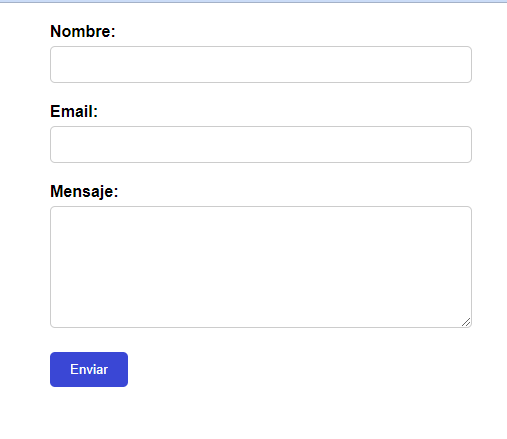
Tiempo de lectura: 2 minutosalert(‘Nombre: ‘ + name + ‘\nEmail: ‘ + email + ‘\nMensaje: ‘ + message); } // Agregar evento de envío al formulario document.getElementById(‘form’).addEventListener(‘submit’, enviarDatos); </script> </body> </html> El código muestra un formulario simple con tres campos: nombre, correo electrónico y mensaje. Se utiliza HTML y CSS para estructurar y estilizar el formulario, mientras que JavaScript … Read more

Slider Button in HTML, CSS, and JavaScript

Slider Button in HTML, CSS, and JavaScript

Tiempo de lectura: 2 minutosReading Time: 2 minutes Photo by Pixabay Here is an example of how to create a simple sliding button or slider using HTML, CSS, and JavaScript. This code demonstrates how to create a sliding button or slider using HTML, CSS, and JavaScript. The goal is to change the state of the button when clicked. <!DOCTYPE … Read more

Changing Button Background Color on Click in HTML, CSS, and JavaScript

Changing Button Background Color on Click in HTML, CSS, and JavaScript

Tiempo de lectura: 2 minutosReading Time: 2 minutes Photo by Pixabay In the example, I’m showing a button with a blue background color. When the button is clicked, the background color changes to green. The HTML code to display the button is as follows. <!DOCTYPE html> <html> <head> </head> <body> <button class=”custom-button” onclick=”changeColor()”>Click Me</button> </body> </html> I add style … Read more

Stopwatch Using HTML, CSS, and JavaScript

Stopwatch Using HTML, CSS, and JavaScript

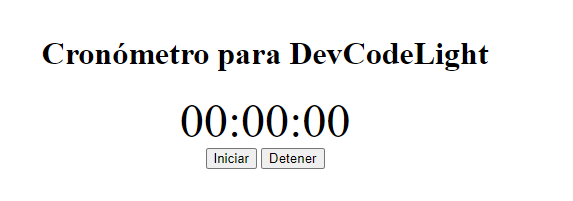
Tiempo de lectura: < 1 minutoReading time: < 1 minute To create a stopwatch in HTML, CSS, and JavaScript, you can follow the code example below: <!DOCTYPE html> <html> <head> <title>Stopwatch</title> <style> .container { text-align: center; margin-top: 50px; } .time { font-size: 48px; } </style> </head> <body> <div class=”container”> <h1>Stopwatch for DevCodeLight</h1> <div class=”time”>00:00:00</div> <button onclick=”start()”>Start</button> <button onclick=”stop()”>Stop</button> </div> <script> … Read more

Tutorial on Creating a Web Loader using CSS and JavaScript

Tutorial on Creating a Web Loader using CSS and JavaScript

Tiempo de lectura: 2 minutosReading time: 2 minutes Web loaders, also known as spinners, are visual elements used to indicate that a web page is loading content or processing an action. In this tutorial, we will learn how to create a custom web loader using CSS and JavaScript. The result will be an animated and visually appealing loader that … Read more